Google Reviews Scraper Pro: Google Maps Review Scraper
Multi-business collection, review history, image storage, and a REST API

Inside the project
1 / 2 · CLI statistics and CSV export
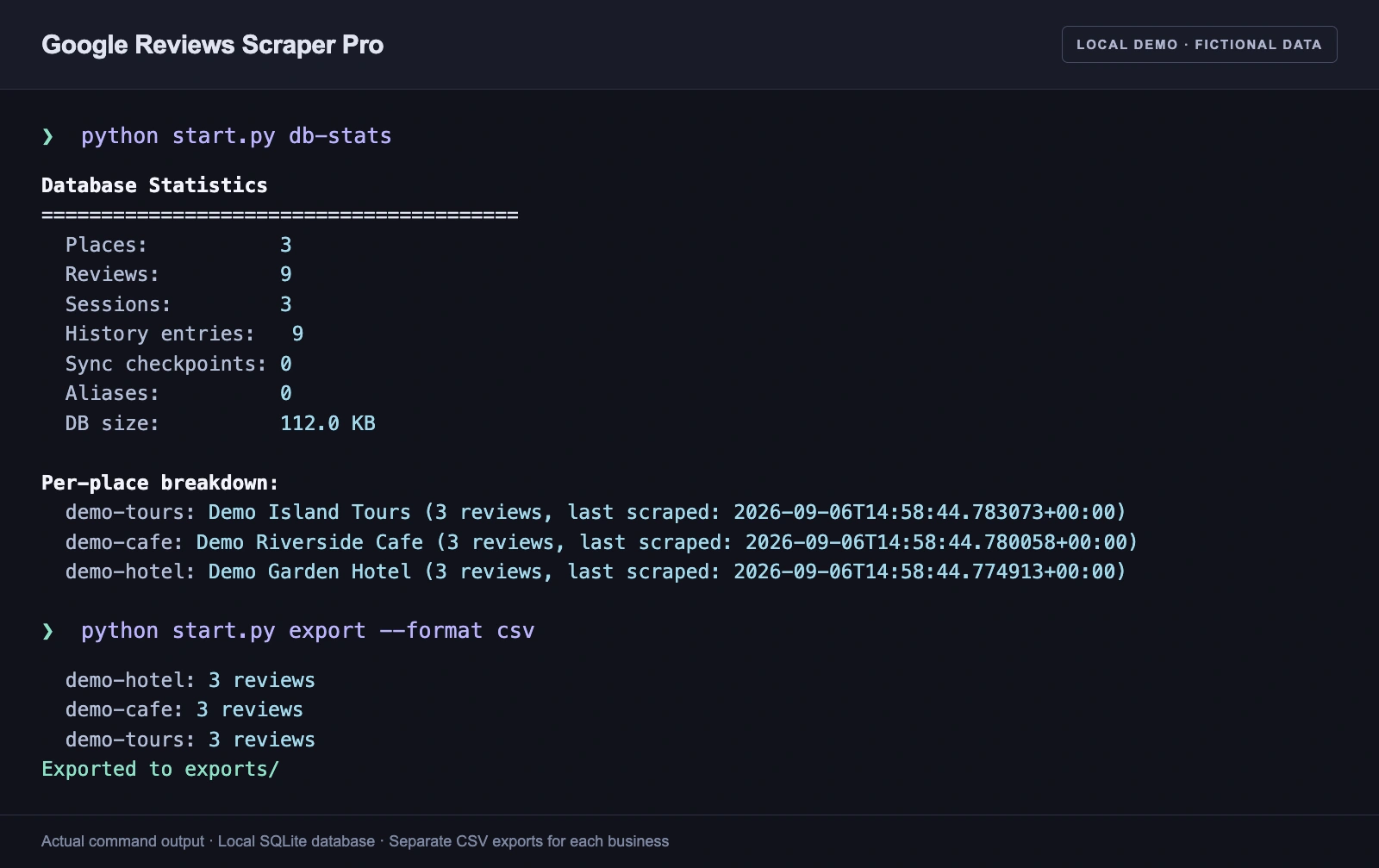
Actual db-stats and CSV export output, formatted for readability. Local demo with fictional businesses and reviews.
Open imageGoogle Maps reviews, organized for real work
Google Reviews Scraper Pro is an open-source Python application for scraping Google Maps reviews and turning them into a structured, maintainable dataset. I built it for businesses that need to follow customer feedback across their locations, keep review content and images together, and connect that information to reporting or existing applications.
It combines a browser scraper, local review database, command-line toolkit, and REST API. That gives the project a role beyond collecting a single export: it supports repeatable collection, tracks changes between runs, and makes the resulting data available to other tools.
Collect across businesses and languages
One configuration can cover multiple Google Maps listings, with shared defaults and settings for individual businesses. Each location keeps its own review records and image folders.
Collection supports multilingual review text, ratings, reviewer information, owner responses, review photos, and profile images. Hotel and restaurant reviews can also include category scores such as rooms, cleanliness, food, and service when those details are available.
Sorting, date windows, and review limits let users focus a collection. Separate modes support collecting new reviews, updating existing records, or performing a full rescan.
A review database with memory
SQLite is the primary store, keeping places, reviews, scrape sessions, and review history together. Change detection distinguishes new, updated, restored, and unchanged records. History makes it possible to follow how feedback evolves across collection sessions.
For example, a team managing several hotel listings can maintain a separate dataset for each property, collect recent feedback, and export the results for comparison. The session records provide context for when the collection happened, while review history helps distinguish a new review from an edit to an existing one.
Images and application integrations
Review and profile images can be downloaded in parallel and organized by business. Optional S3-compatible storage supports AWS S3, Cloudflare R2, and MinIO. Configurable URL replacement lets an application use its own image hosting while preserving original links.
Optional incremental MongoDB synchronization connects the local dataset to applications already using MongoDB. The modular processing pipeline separates collection, enrichment, image handling, and storage, giving developers distinct places to adapt the workflow.
A toolkit for ongoing review management
The CLI covers JSON and CSV exports, importing existing data, database statistics, hiding and restoring stored reviews, and history maintenance. Hiding a record controls the local dataset and exports; it does not remove a review from Google Maps.
After configuring the business listings, a typical workflow is:
python start.py
python start.py db-stats
python start.py export --format csv
python start.py logs --lines 100 --level ERROR
Structured logs, scrape-health checks, and selector-health telemetry help operators investigate failed or degraded collections. Browser-session recovery can preserve partial results and retry interrupted work.
Run it as a service
The FastAPI server lets other applications submit scraping jobs, inspect progress, and manage their lifecycle. Its review endpoints expose paginated results, place details, individual reviews, and change history, so a consumer can retrieve the data it needs without working directly with the database.
Interactive API documentation supports integration work. Named API keys and request audit logs provide access-management tools; key-based authentication takes effect when active keys are configured. System endpoints also expose database statistics and collection-health information.
Open source and extensibility
The public repository includes the implementation, sample configurations, tests, and documentation. Developers can use the CLI for a standalone workflow or integrate the API into a larger application. Collection depends on the Google Maps interface, so the operational tooling is useful for checking what each run actually collected.
Technologies: Python, SeleniumBase, Google Chrome, SQLite, FastAPI, MongoDB, and S3-compatible storage.
Explore the GitHub repository, CLI implementation, and REST API.